Finance AI colleague
Spreadsheet discrepancies foundXLS rows → discrepancies for review
 Discuss your workflow
We build AI agents that handle tasks across your CRM, ERP, email and business tools, while your team stays in control.
Built for your business. Deployed in your infrastructure.
See how information from your systems becomes a reply, a finding or a follow-up task. Then open the workspace to try it yourself.
XLS rows → discrepancies for review
Product document → fields for review
Role + start date → onboarding steps
Email + CRM → reply with context
Invoice + order → evidence to review
Customer request → task and next step
Image + knowledge base → suggested answer
Role + start date → onboarding steps
CRM + recent emails → meeting context
Product document → fields for review
XLS rows → discrepancies for review
Keep your CRM, ERP, email and website. Agents automate the work between them.
An invoice arrives. Let the finance agent check it against the order.
Could this help your team? We adapt the process to your systems and rules.
Discuss a similar workflowExample monthly workload: documents × handling time. Compare these examples with the work your team handles today.
Open PDF → copy details → match order → flag differences
Invoice extracted and checked against the order.
Your team reviews exceptions and approves.Read PDF → find product codes → copy specifications into ERP
Product details extracted and structured for your catalogue or ERP.
Your team checks missing details and approves updates.Check dispatch note → match order → update status → notify customer
Dispatch documents matched, status updates and customer messages prepared.
Your team handles exceptions and controls what is sent.Let AI handle the reading, matching and data entry. Your team focuses on exceptions and decisions.
Hospitals receive safety data sheets for the chemical products they use. Each supplier has its own document layout, and the files arrive in different languages.
We built ProductRoom to automate this process. AI reads the documents, extracts the safety information and organises it into a consistent, searchable structure. Hospital staff review exceptions instead of processing every file themselves.
“The solution is very well designed and helpful. It takes a tremendous amount of work off our hands, and we can once again focus on other safety-related topics.”
Christian Oertig · Safety Specialist, SIBE
Lucerne Cantonal HospitalPreviously, a staff member had to open each file, find the relevant safety rules and enter that information manually. The same work had to be repeated across suppliers and document versions.
A service team supports ongoing SDS management. These figures describe hospital staff time, not total service-team effort.
Supplier documents → AI extraction → structured safety information → human review
Discuss a similar processRMO Agency helps contractors in California with licensing. Before accepting an applicant, its team needs to review their business, finances and background.
We built a workflow that reads these documents, extracts the relevant facts, checks financial inconsistencies and gathers reputation evidence with links to its sources. It brings the findings into one assessment report, with explanations behind the checks and risk score.
Previously, a reviewer had to work through application documents, bank statements and background reports, check for inconsistencies and research the business’s reputation. The findings then had to be brought together for a decision.
We built an AI-powered workflow that extracts application and financial data, checks inconsistencies, researches business reputation and prepares a structured assessment report.
For the manual assessment process, as described by RMO Agency.
Documents → AI extraction → financial & reputation checks → report → human decision
Discuss a similar process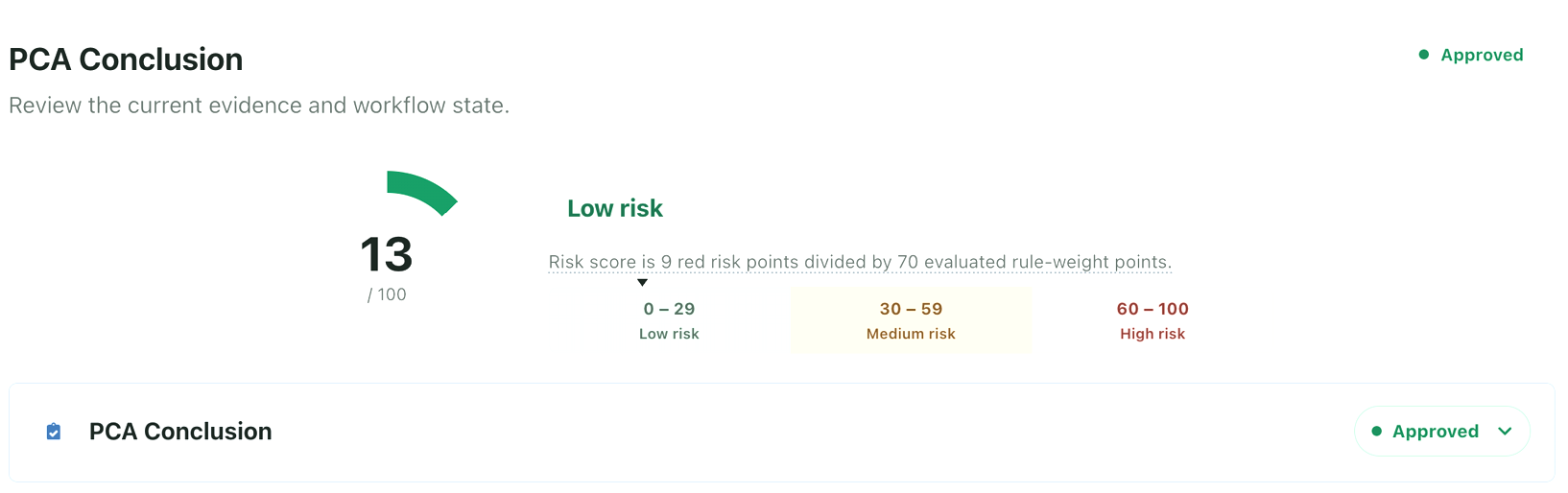
Before a clinical trial can start at a clinic, the study team needs to check whether that clinic has suitable patients, equipment and the ability to carry out the required procedures.
The Awairis pilot brings these steps into one workflow. AI extracts requirements from the protocol, flags missing or conflicting information for review and uses the reviewed information to prepare a study-specific questionnaire.
The requirements are described in a detailed trial protocol. Preparing a site-assessment questionnaire means finding those requirements in the document and turning them into specific questions for each clinic to answer.
The team can check and correct the extracted facts. Each questionnaire stays linked to the protocol version it was generated from, so reviewers can trace where its requirements came from.
Trial protocol → extracted requirements → expert review → site-assessment questionnaire
Discuss a similar processConnect the documents, decisions and actions — without your team moving every step manually.
An assistant can read relevant documents, prepare replies, check information and carry out permitted actions across your systems. You decide what it can see, what it can do independently and where a person must approve.
Start with the work that takes the most time from your team. We build the automation around it.
Explore example workflowsConnect your CRM, ERP, email and custom software so information moves with the work, instead of being copied by hand.
Familiar examples. Not a closed list.
 Salesforce
 HubSpot
 Dynamics 365
 Exact
Exact AFAS
AFAS Business Central
 Outlook
 Teams
Teams SharePoint
Connect the tools you already rely on through their APIs — including your own software.
From incoming information to completed work, across the systems your team uses.
Plus your websites, documents and custom APIs.
Not every process needs AI. If your existing software or a simpler automation solves the problem, that belongs in the discussion.
An assistant gets a defined task and limited access, not the keys to your entire company. We agree the controls before enabling actions.
Grant only the system access and actions needed for the task. A sales assistant does not automatically get access to payroll.
Define which sources and workspaces each role may use. Choose isolation controls appropriate to the sensitivity of your information.
API keys stay outside prompts and chats, in protected secret storage. OneCLI or an agreed access mechanism controls integration access.
Agree which emails, record changes and financial or HR actions need review. Approval applies to the prepared action, not a blanket permission.
Make actions, results, usage and costs visible to authorised people. Agree what is logged and how long it is retained.
Plan controlled retries and manual recovery. Test partial failures and agree who handles incidents and API changes before launch.
Deploy in Azure, AWS, Google Cloud or another agreed environment. Define what can reach AI providers, where processing happens and how retention works. Hosting in your cloud does not automatically keep all processing there.
When existing interfaces are not enough, we build a dashboard around your operations: status, results, exceptions, approvals and actions across connected systems.
Source evidence and approvals, alongside the work.
Work in familiar tools, with a custom dashboard where your team needs a clearer overview.
Our engineers turn document, image and voice capabilities into working business processes — connected to your systems and built around your team.

From analysis to a trained team: we build and deploy automation for your business. Your proposal defines the scope and price. Hosting, API/AI usage and support are separate operating costs.
We map your manual work, systems and constraints, then agree the workflow, permissions and acceptance criteria with your team.
We build and test automation tailored to the agreed process, your systems and your business rules.
We deploy the solution in your infrastructure, with agreed access, configuration and operational responsibilities.
We train your team to use the solution, review its work and handle exceptions, with a practical handover.
Use the people involved in one process, not your entire headcount. Change the assumptions to match your business.
Enter valid values within the indicated limits.
Calculation: people × hours per week × assumed reduction × 52 ÷ 12. Value = released hours × hourly cost. The 20% starting value is an editable example, not a forecast.
Released capacity is not automatically a cash saving. This estimate excludes implementation, hosting, API/AI and support costs. Validate the assumptions in a pilot.
Discuss this processThe focus is a defined workflow across your systems: relevant context, permitted actions, review points and traceable results. A chat can be one interface, not the whole solution.
Where the API and your permissions allow it. We agree which actions may run automatically and which require human approval before implementation.
We agree the data flow, hosting, model providers and retention for your solution. Integration secrets stay outside prompts in protected storage; access is limited to the agreed scope.
No replacement is required by this approach. We assess your existing APIs first, including custom systems, and identify any constraints before committing to scope.
Start with one manual process and the systems involved. Together we assess feasibility, agree a measurable pilot scope and provide a proposal. No fixed delivery date or saving is promised before that assessment.
Tell us where your team loses time. Together, we identify a useful first process to automate. Implementation starts from €10,000.
Your Dutch point of contact: Sander connects your business process and priorities with the SapientPro engineering team.